Making Headlines Font for Web Design
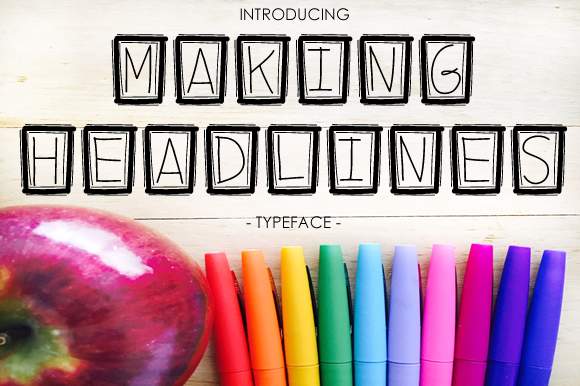
As a web designer, finding the right font can make or break the visual impact of a project. Making Headlines is a decorative typeface that brings a playful yet professional tone to digital content. Its sketchy, quirky rectangles frame each character, giving it a hand-drawn charm that’s perfect for creative and friendly designs.
This font has a unique personality that blends fun with readability. The framed characters add texture without overwhelming the text, making it suitable for both short phrases and longer headings. Whether you're working on a landing page, a blog header, or an online store banner, Making Headlines adds a touch of character that stands out.
Using Making Headlines in Website Layouts
Making Headlines shines in hero sections and website headers where a bold statement is needed. Its quirky design makes it ideal for creative portfolios, boutique stores, or coaching websites that want to convey a relaxed, approachable vibe. Pairing this font with a clean sans serif for body copy ensures a balanced layout that's easy on the eyes.
In call-to-action areas, this font can draw attention without being distracting. It works well for buttons and short phrases like "Start Now" or "Shop Today." For online shops, using Making Headlines in product banners or promotional graphics adds a unique flair that sets your brand apart from competitors.
Readability and Visual Hierarchy
While Making Headlines is a decorative font, its structure ensures good readability even at smaller sizes. On mobile screens, it maintains clarity when used for section headings or subheadings. However, it's best reserved for short bursts of text rather than long paragraphs.
Its visual weight helps establish hierarchy in a layout. When used as a primary heading, it naturally draws the eye, guiding users through the content flow. This makes it a great choice for digital ads, course pages, or any content that needs to stand out quickly.
Font Pairing and Brand Consistency
To maintain a cohesive look, consider pairing Making Headlines with a simple sans serif or serif font for body text. This contrast enhances readability while keeping the overall design visually interesting. For editorial-style sites, a serif font can provide a more polished feel, whereas a sans serif offers a modern, clean aesthetic.
Consistency is key when building a brand identity. Using Making Headlines across all branded web content—such as headers, logos, and social media graphics—creates a unified look that reinforces your brand message. This is especially useful for digital brand kits or templates that need to be applied consistently across multiple platforms.
Practical Applications and Examples
Making Headlines works exceptionally well in a variety of contexts. For a creative portfolio site, it can be used in project titles or taglines to reflect the designer's playful yet professional style. In a boutique online store, it can add personality to product categories or promotional banners.
A coaching website might use this font for headlines in blog posts or course descriptions, creating a warm and inviting atmosphere. Similarly, a product landing page can benefit from its use in feature headings or testimonials, making the content more engaging and memorable.
For digital ads, the font’s distinctive look can help capture attention in a crowded space. Just ensure it doesn’t clash with background colors or images. Testing it on dark and light backgrounds is essential to maintain legibility and visual appeal.
Licensing and Technical Considerations
Before implementing Making Headlines into client projects or online stores, check the licensing terms. Commercial use requires proper font licensing, especially for websites, landing pages, or digital templates. Ensure the font supports the languages and characters you need, and confirm if it includes webfont formats for seamless integration into responsive layouts.
Also, verify if the font includes alternate glyphs or weights that could enhance your design. These variations can be useful for adding subtle stylistic touches or adjusting the font’s appearance for different sections of a website.
When designing for mobile responsiveness, test how the font renders on various screen sizes. While it performs well in most cases, it’s always wise to have fallback fonts ready in case of compatibility issues or performance concerns.
Making Headlines is more than just a decorative font—it’s a versatile tool that can elevate the visual storytelling of your digital projects. Whether you're crafting a brand identity, designing a landing page, or enhancing a portfolio, this font adds a unique personality that resonates with users and supports your design goals effectively.